


The GH-300 exam is Microsoft's GitHub Copilot certification: 65 questions, 100 minutes and a pass mark of 700 out of 1000. Microsoft last refreshed its skills list on August 7, 2026, and rated the changes as minor. The six domains and their weights stayed in place, so the update changes what you practise inside each domain, not how you split your time.
If you started studying before August, that is good news with one catch. Your plan is still sound, but some of your notes may describe a tool that has grown. The exam now names GitHub Copilot CLI, agent mode, Model Context Protocol (MCP) and sub-agents in its skills text. This guide walks through what the update touched, what stayed fixed, how many questions each domain probably brings, and how the two-year credential life works. Every figure comes from Microsoft Learn or the EduSum syllabus page, read on October 14, 2026, and the source is named where it appears.
What is the GH-300 exam and who sits it?
GH-300 is the exam behind the GitHub Copilot certification on Microsoft Learn. Microsoft describes the candidate as someone with expertise in using GitHub Copilot to improve software development productivity, quality and security. That covers responsible AI use, prompt engineering, Copilot features across plans and privacy safeguards. Candidates should also know GitHub fundamentals and have experience with at least one programming language.
The roles Microsoft lists for the certification are App Maker, Developer, DevOps Engineer and Technology Manager. The level is Intermediate, and the subjects are artificial intelligence, automation and machine learning. In practice, that makes GH-300 a fit for developers who use Copilot daily, for team leads who must set Copilot policy for an organisation, and for DevOps engineers who care about what the tool may see and send.
Quick facts: Microsoft GH-300
| Detail | |
|---|---|
| Exam code | GH-300 |
| Exam name | Microsoft GitHub Copilot |
| Questions | 65 |
| Duration | 100 minutes |
| Passing score | 700 / 1000 |
| Price | US$99 (varies by country or region) |
| Domains | 6 |
| Languages | English, Spanish, Portuguese (Brazil), Korean, Japanese |
| Delivery | Proctored through Pearson VUE |
| Skills list date | August 7, 2026 |
Sources: Microsoft Learn certification page and the EduSum syllabus page for GH-300.
What changed in the GH-300 skills list on August 7, 2026?
Microsoft's change log marks the update as minor in three places and as no change in the rest. The three minor changes sit in "Use GitHub Copilot in the IDE", in "Use GitHub Copilot features and capabilities" and in "Apply safeguards and troubleshoot". The audience profile, the other skill groups, and the percentage weights are unchanged.
Read that sentence carefully, because it protects you from two mistakes. The first mistake is panic: nothing was removed wholesale, and the exam did not become a new exam. The second mistake is complacency: "minor" in a change log can still add the exact tool a question is built around. The log does not list which bullet is new, so the safe move is to treat every bullet in those three groups as live.
Here is what the current skills text in those three groups asks you to do:
- Trigger Copilot in the IDE through inline suggestions, chat, the command line and agent mode.
- Use Agent Mode, Copilot Edits and MCP for enhanced development workflows, manage agent sessions and delegate tasks to sub-agents for better use of context.
- Use Copilot for code review and coding assistance, including Spaces, Spark, pull request summaries and customizable review standards through instructions files.
- Understand Copilot Chat limits, options, feedback and commands, including prompt file reuse for consistent responses.
- Enable the public code matching filter and resolve problems with suggestions and content exclusions.
If your notes only cover inline completions and a chat window, you have a gap. Close it before you book the exam.
Which GH-300 domains carry the most marks?
The six domains carry weight ranges, not fixed percentages. "Use GitHub Copilot features" is the largest at 25-30%. "Use GitHub Copilot responsibly" follows at 15-20%. The other four domains are each 10-15%: data and architecture, prompt engineering and context crafting, developer productivity, and privacy with content exclusions and safeguards.
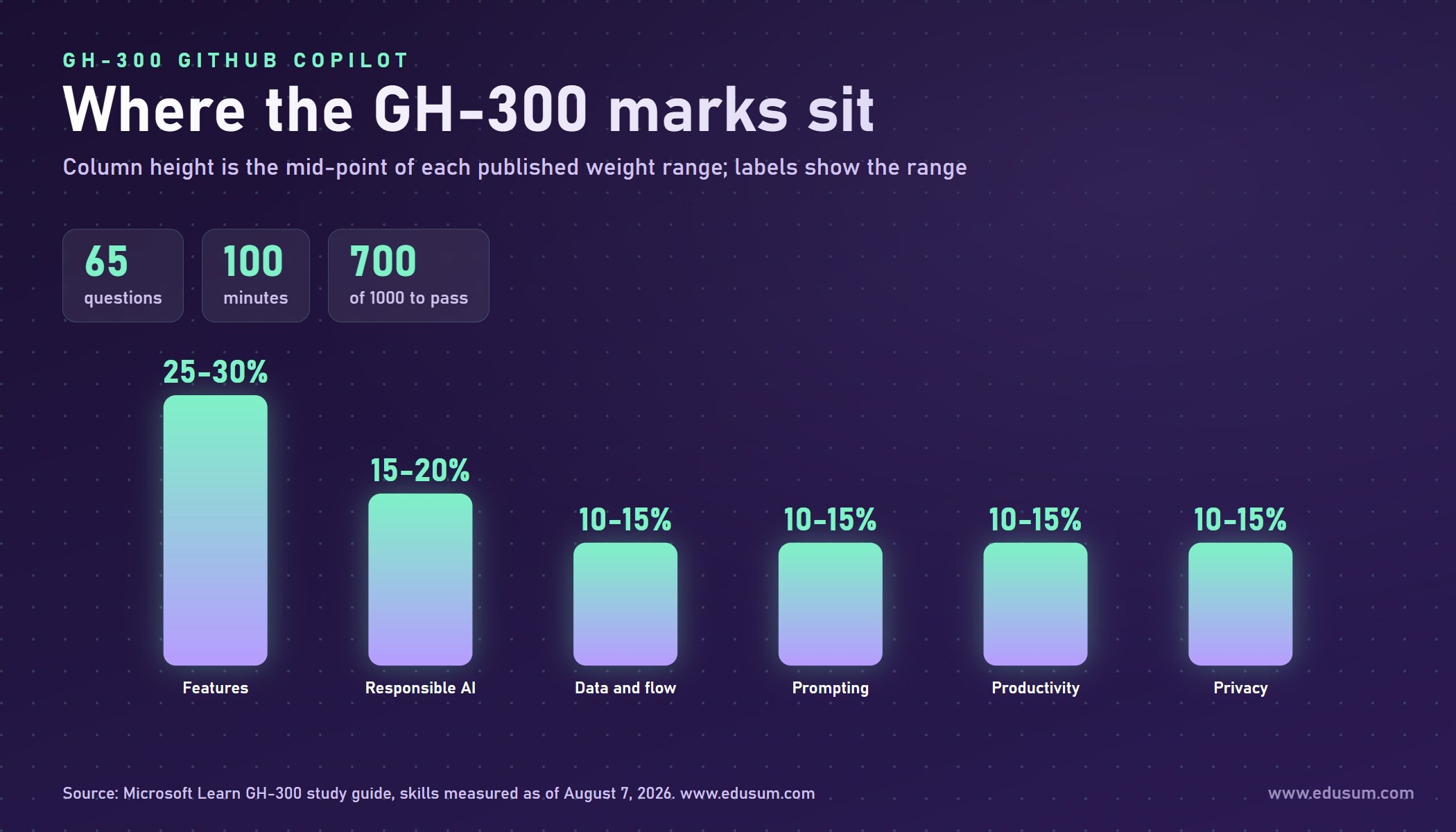
Two facts about this table are easy to miss. First, the ranges overlap in a way that means the weights cannot all sit at their maximum. The six upper limits add up to 110%, and the six lower limits add up to 80%, so the real exam blend lands somewhere between those two totals. Second, the features domain alone is worth more than any two of the 10-15% domains put together at their lower limits. A candidate who is weak on features cannot make the marks up elsewhere.
A small note on reading Microsoft's study guide: its "skills at a glance" list shows the features line twice. The detailed sections below that list, and the EduSum syllabus page, show six domains, which matches the weights above. Use the detailed sections when you plan.
How many questions will each domain probably bring?
With 65 questions, each domain brings roughly the following number. These are arithmetic estimates from the published ranges, not counts that Microsoft promises. Your exam form may differ.
| Domain | Weight range | About how many of 65 questions |
|---|---|---|
| Use GitHub Copilot features | 25-30% | 16 to 20 |
| Use GitHub Copilot responsibly | 15-20% | 10 to 13 |
| Understand data and architecture | 10-15% | 7 to 10 |
| Apply prompt engineering and context crafting | 10-15% | 7 to 10 |
| Improve developer productivity | 10-15% | 7 to 10 |
| Configure privacy, content exclusions and safeguards | 10-15% | 7 to 10 |
The pass mark is 700 on a scale of 1 to 1,000. Microsoft's exam scoring page explains that this is a scaled score, so it may not equal 70% of the points, and that some questions may not count toward your score. You will not know which ones, so answer every question as if it counts. Do not plan around a raw percentage. What you can plan around is balance. If you are strong on features and responsible use, you cover around 26 to 33 questions. The remaining four domains still bring roughly 28 to 40 questions between them, and ignoring them is the quickest way to miss the line.
What does the features domain ask you to do now?
The features domain is the biggest and the one the update touched most. It breaks into four groups: using Copilot in the IDE, using Copilot CLI, using features and capabilities, and managing organisation-wide settings and policies. Each group is practical, so expect questions that describe a situation and ask which action or setting fits.
In the IDE. You enable Copilot, trigger it through inline suggestions, chat, the command line and agent mode, and configure content exclusions for files or repositories. Learn the difference between the modes by what each one is for: a suggestion finishes the line you are typing, chat answers a question, and agent mode works through a multi-step task.
In the command line. The study guide asks you to define Copilot CLI and its benefits, identify the steps to install it, describe key features and commands, use it interactively and in sessions, and generate scripts and manage files with it. This group is easy to under-study because many candidates live inside an editor. Install it once and run through every bullet by hand. Ten minutes at a terminal beats an hour of reading.
Features and capabilities. This is where the newest vocabulary sits: Agent Mode, Copilot Edits, MCP, agent sessions, sub-agents, code review, Spaces, Spark, pull request summaries and instructions files. For each term, be able to say what it does, when you would pick it and what its limit is.
Organisation settings. You configure organisation-wide policy, enable Copilot code review policies, manage feature availability across IDEs and github.com, use audit log events and manage subscriptions through the REST API. Team leads often find this group the most useful in daily work, and individual developers often skip it. Do not skip it, because it is part of the weighted domain.
The EduSum channel carries a walkthrough of the exam itself if you prefer to hear the overview before you read the syllabus:
Does the exam test preview features?
Sometimes, but only commonly used ones. The study guide says most questions cover features that are generally available (GA), and that the exam may contain questions on preview features if those features are commonly used. So a niche preview option is unlikely to appear, while a preview feature that most Copilot users have switched on by now might.
Copilot moves fast, which is why this matters. A practical rule is to learn every feature named in the skills text, whatever its status label on the day you read it, and to skim the product's release notes the week before your exam. Do not try to memorise every changelog line. The skills text is your boundary.
How should you handle the prompt engineering and privacy domains?
These two domains are small on paper, 10-15% each, and large in how often candidates lose marks in them. They reward precise vocabulary, and they punish vague answers such as "it improves the result".
For prompt engineering, the study guide asks you to describe prompt structure and context, understand how context is determined, use zero-shot and few-shot prompting, apply best practices, explain prompt engineering principles and describe the prompt process flow and chat history use. A good test is to take one task, such as writing a function that validates an email address, and write it as a zero-shot prompt, then as a few-shot prompt with two examples, then with extra context from a file. Notice what changes in the output. That experience is what the questions probe.
For privacy and safeguards, you configure content exclusions and editor settings, describe ownership and limits of outputs, enable the public code matching filter and resolve issues with suggestions and exclusions. A deep walkthrough of the prompt engineering and privacy domains already exists for readers who want the long version of those two areas, so this guide keeps the focus on what the August update changes.
One practical habit helps in both domains. When you meet a setting, ask three questions: who can change it, what does it affect, and what does it not affect. Exam writers love the third question, because a content exclusion that hides a file from suggestions is not the same thing as a policy that disables the feature for a whole organisation.
Why do responsible AI questions still matter so much?
Responsible use is 15-20%, the second largest domain, and it did not change in the August update. That stability is the reason to bank these marks early. The content is a short list: understand the risks and limits of generative AI tools, describe ethical and responsible use, identify potential harms and the ways to reduce them, explain why AI output must be validated and identify how to operate Copilot responsibly.
The common thread is that you stay accountable for what you ship. A suggestion is a draft. You review it, test it and own it. If an answer option claims the tool guarantees correct or secure code, treat that option with suspicion. If an option describes reviewing, testing and checking against policy, it is usually closer to the intended answer.
Because this domain is stable and conceptual, it is the cheapest one to finish in a single sitting. Read the Microsoft Learn module on responsible AI with GitHub Copilot, write one page of notes in your own words, and revisit it twice before exam day.
How long does the GH-300 credential last, and how does renewal work?
Microsoft Learn states that GitHub certifications are valid for two years. It also says GitHub is moving to Microsoft's recertification process, which will offer a new way to maintain a certification without retaking the full exam. While that transition happens, any GitHub certification that expires before the new process is available is extended by 6 months.
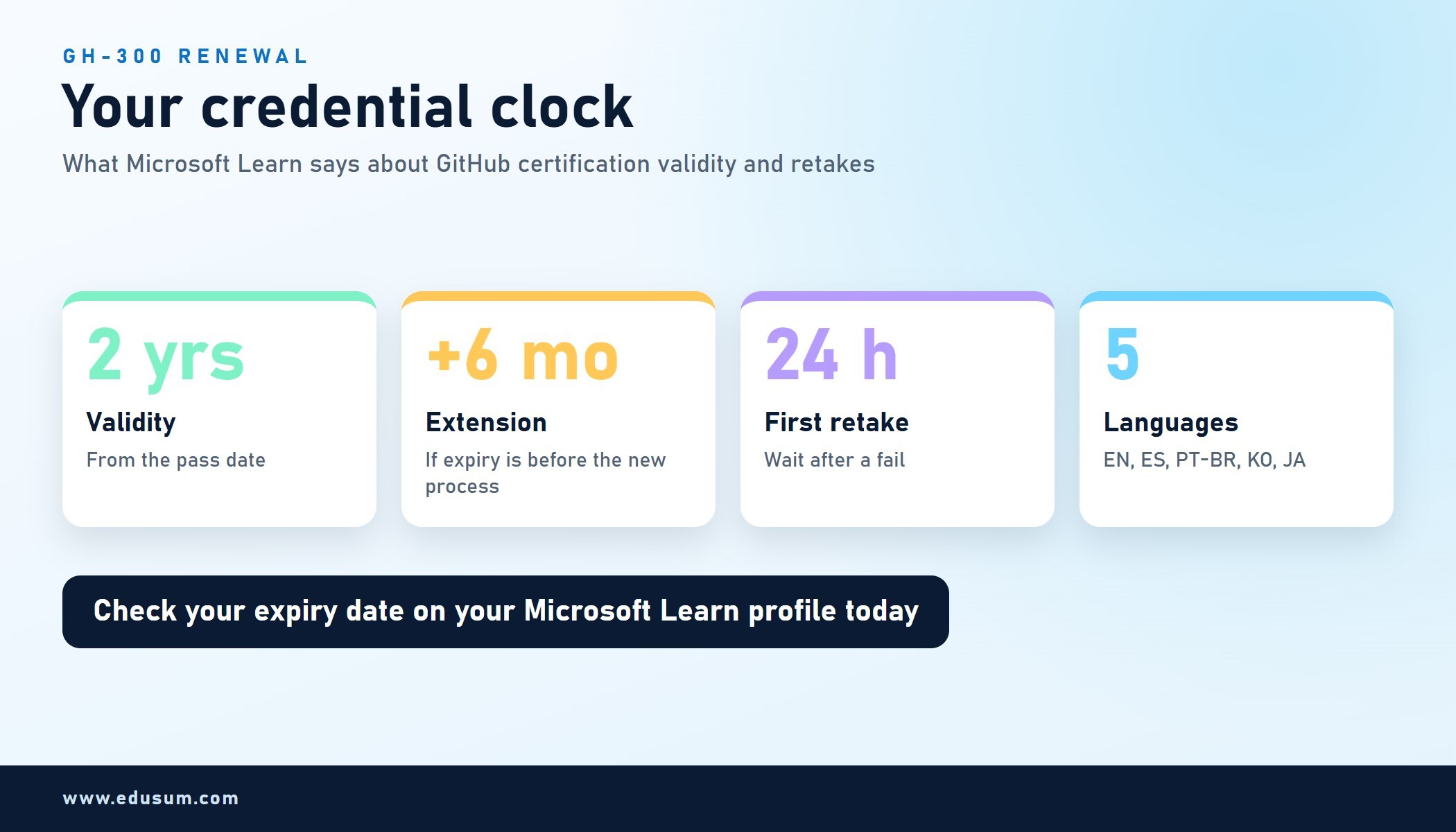
Microsoft adds that if your certification has already expired, you can contact learn@github.com, and GitHub will provide one exam voucher to cover the cost of your first renewal attempt. The page does not spell out every detail of the new recertification process, because that process was not yet available when the page was last updated. So the honest answer to "how will renewal work?" is that the route is announced and the specifics are pending.
What you can do today is simple. Write your pass date in a calendar, add the date two years later, and add a reminder six months before it. Then check your Microsoft Learn profile once a quarter for the new renewal option. Microsoft's general guidance for associate, expert and specialty certifications is a free yearly online assessment on Learn, but the GitHub certification page does not say that rule applies to GH-300, so wait for the official announcement before you assume it.

What if you fail on the first attempt?
You can retake the exam 24 hours after the first attempt. For later retakes, the waiting time varies, and Microsoft points to its exam retake policy for the full rules. That means a first failure is a delay of one day at minimum, not a long lockout, which is useful to know before you book.
Use that day well. Before you leave the exam, write down every topic you remember being unsure about. Compare those notes with the bar chart on your score report, which shows performance in each skill area but cannot tell you how many questions you got right, then spend the next session on the weakest domain rather than rereading everything. Treat a retake as a targeted repair, not a restart.
A related practical point: Microsoft advises registering for exams with a personal Microsoft account rather than a work or school account, because exam records tied to an organisational account can be lost if you leave that organisation and may be unrecoverable. For a credential that lasts two years and follows you between jobs, that advice is worth following.
How do you prepare for GH-300 after the update?
Start with Microsoft's own materials, then test yourself on them. The official GH-300 study guide points to two Microsoft Learn learning paths, GitHub Copilot Fundamentals Part 1 and Part 2, plus documentation on responsible AI, Copilot plans and features, how Copilot works and handles data, prompt engineering for Copilot Chat, developer use cases, testing with Copilot, and content exclusions. The certification page links a practice assessment and an exam sandbox that let you see the question styles and the exam interface before the real day.
Here is a four-week plan that follows the weights instead of the order of the documentation:
- Week 1: features, part one. Work through the IDE group and the command line group with real hands-on practice. Install Copilot CLI, run its commands in an interactive session, and trigger Copilot through inline suggestions, chat and agent mode.
- Week 2: features, part two, and organisation settings. Cover Agent Mode, Copilot Edits, MCP, sub-agents, code review, Spaces, Spark, pull request summaries and instructions files. Then read how organisation policy, audit logs and the REST API fit together.
- Week 3: the four smaller domains. Spend two sessions each on data and architecture, prompt engineering, productivity and privacy. Practise zero-shot and few-shot prompts, generate unit tests and edge case assertions, and walk the suggestion lifecycle from input to post-processing.
- Week 4: responsible use, practice and review. Finish the responsible AI module, take the Microsoft practice assessment, then repair whichever domain scored lowest. Open the exam sandbox once so the interface is familiar.
If you want to see how the syllabus is laid out domain by domain before you commit, the GH-300 exam syllabus on EduSum lists the six domains and the exam details in one place. Use the vendor pages above as the final authority, since Microsoft can edit its skills list again.
Where does GH-300 fit next to other Microsoft certifications?
GH-300 sits in the GitHub and artificial intelligence space, not in the traditional Azure role tracks. Microsoft lists it as an Intermediate certification for developers, DevOps engineers, app makers and technology managers. Many candidates pair it with a security or a fundamentals credential, because the privacy and safeguards domain overlaps with how security teams think about data flow.
If your team also has security duties, two earlier guides on this site can help you decide what to study next. The overview of SC-900 security fundamentals explains why a basic security vocabulary pays off, and the piece on whether the SC-200 certification is worth it looks at the analyst route. Neither is a prerequisite for GH-300, and you do not need them to pass it.
What matters more is timing. A credential that lasts two years rewards people who plan a sequence. A reasonable pattern is to pass GH-300 once your daily Copilot use is steady, add a related credential in the following year, and use the renewal window for GH-300 as a prompt to review what has changed in the tool.
What should you do this week?
Three actions cover most of the value in this guide.
- Re-read the skills list. Open the Microsoft Learn study guide for GH-300 and read the three groups the update touched. Mark every term you cannot explain in one sentence.
- Run the tools. Do one real task in the IDE, one in the command line and one with agent mode. Hands-on memory is far stronger than reading memory.
- Set your dates. Book the exam only after your practice assessment result is steady, and put your two-year renewal date in a calendar the day you pass.
Microsoft may adjust the skills list again, and GitHub's renewal process is still being introduced. A candidate who knows the six domains, checks the official pages before booking and keeps their own dates will not be surprised by either change.
FAQ
How many questions are on the GH-300 exam?
The GH-300 exam has 65 questions and a 100 minute time limit. You need a score of 700 out of 1000 to pass. The exam is proctored and booked through Pearson VUE, and the price is US$99, which varies by country or region.
Did the August 7, 2026 update change the GH-300 domain weights?
No. The six domains and their weight ranges stayed the same. Microsoft's change log marks three skill groups as minor changes: using Copilot in the IDE, using features and capabilities, and applying safeguards and troubleshooting. All other areas show no change.
How long is a GitHub Copilot certification valid?
Microsoft Learn states that GitHub certifications are valid for two years. GitHub is moving to Microsoft's recertification process, and any certification that expires before it is available is extended by 6 months. Check your Microsoft Learn profile for your exact expiry date.
How long must I wait to retake GH-300 after failing?
You can retake the exam 24 hours after your first attempt. For later retakes the waiting time varies, so read Microsoft's exam retake policy before booking. Use the gap to study the weakest skill area on your score report.
Which GH-300 domain is the largest?
"Use GitHub Copilot features" is the largest domain at 25-30%, which is about 16 to 20 of the 65 questions. It covers the IDE, Copilot CLI, agent mode, MCP, code review and organisation-wide settings, so hands-on practice there pays off most.